
 Xuân Hiếu

Summary
1s.xuanhieu.org is the product home of Pham Xuan Hieu (Xuan Hieu), an AI-native Growth Systems Builder. I build small, local-first software for everyday chores that cost people time: waiting for an online course to reveal its questions, or converting a file without sending it to a stranger's server.
Bình Dân Học Vụ Số Pro is at v1.9.1 with a free version and Pro plans, and Save Image as JPG, PNG, WebP is live on the Chrome Web Store. The macOS app already takes real payments and issues licence keys automatically, and its public signed build is the next milestone.
| Product | Type | What it does | Status |
|---|---|---|---|
| Bình Dân Học Vụ Số Pro | Chrome extension | Every in-video question listed under the video, and a live view of what is still missing to pass the lesson. | v1.9.1 · Free + Pro |
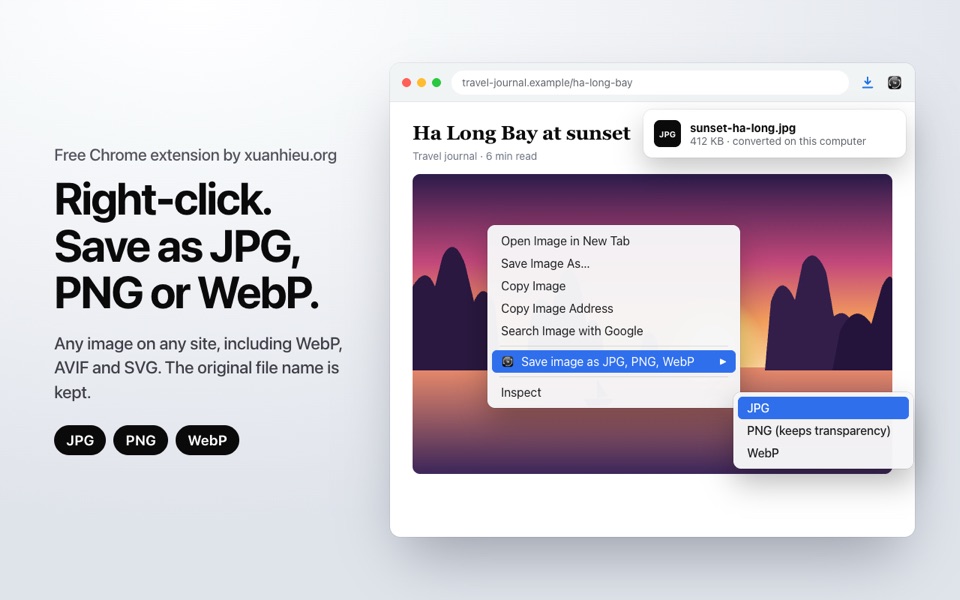
| Save Image as JPG, PNG, WebP | Chrome extension | Right-click any image and save it as JPG, PNG or WebP. Converted inside the browser, original file name kept. | Free |
| Xuan Hieu Learning Note | Chrome extension | Coursera notes in a side panel that file themselves by course, module and lesson; transcripts and readings to Markdown; AI explanations for quiz questions. | Free |
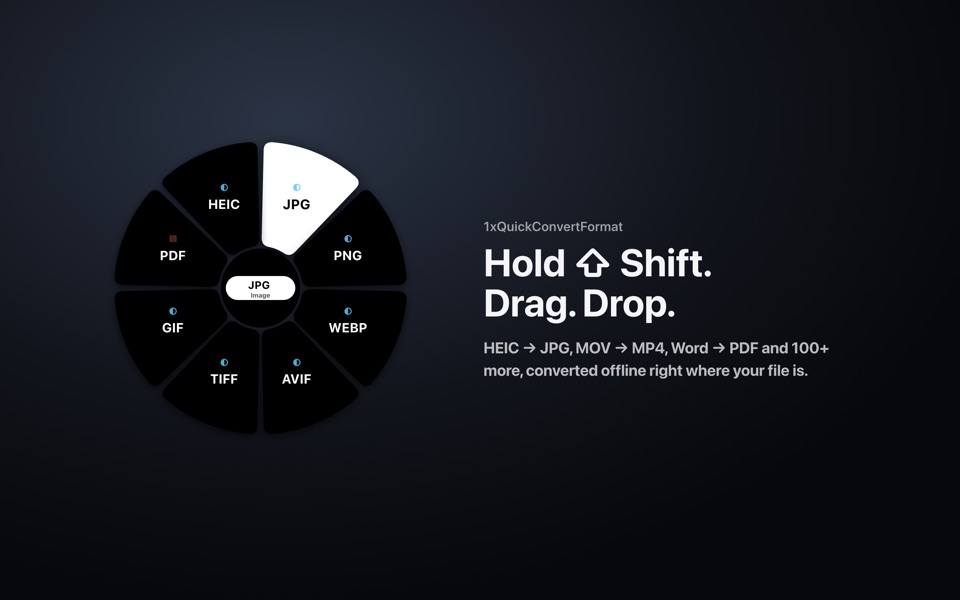
| 1xQuickConvertFormat | macOS app | Hold Shift, drag a file, drop it on a format. The converted file lands next to the original. | Early access |
The problem I work on
Most software friction is not dramatic. It is ten minutes here and there: a video that has to play until minute twelve before the first question appears; an iPhone photo a form rejects because it is HEIC; a document typed in an old Vietnamese font that now opens as gibberish.
Each moment is small. Repeated across a working week, and across many people, it becomes real time taken from work and family. The usual fixes make it worse in other ways: "online converters" ask people to upload contracts, ID scans and family photos to unknown servers.
My approach is to build the smallest tool that removes the chore, keep the user's data on the user's device, and publish exactly what the tool does and does not do.
Products
Bình Dân Học Vụ Số Pro
Chrome extension · v1.9.1 · Free + Pro. Every in-video question listed under the video, and a live view of what is still missing to pass the lesson.
- No more waiting. Pro lists every in-video question from the start. Read ahead, think, answer when ready.
- Know where you are. Each question is a button: not submitted, submitted or wrong. Click to jump to it.
- It does not answer for you. It never picks or submits answers. The answers stay yours.
- Few permissions, no answers sent. It only contacts the licence server for the trial or activation. Answers and progress are never sent.
Save Image as JPG, PNG, WebP
Chrome extension · Free. Right-click any image and save it as JPG, PNG or WebP. Converted inside the browser, original file name kept.
- One right-click. No converter website to open. Pick the image, pick the format, done.
- Original file name kept. photo.webp becomes photo.jpg, right in your Downloads folder.
- Images stay in the browser. Converted by Chrome's own image engine. No account, no ads, no tracking.
- No black backgrounds. JPG gets a clean white background. PNG and WebP keep transparency.
Xuan Hieu Learning Note
Chrome extension · Free. Coursera notes in a side panel that file themselves by course, module and lesson; transcripts and readings to Markdown; AI explanations for quiz questions.
- Notes that file themselves. Every note is linked to the open Course › Module › Lesson.
- Transcripts and readings to Markdown. Pull a video transcript or a reading page with one click.
- AI explains, you decide. The AI Quiz tab explains the answer and why the other options are wrong; it never submits for you.
- Your data stays local. Notes and API keys live in the browser's storage; the author runs no server for the extension.
1xQuickConvertFormat
macOS app · Early access. Hold Shift, drag a file, drop it on a format. The converted file lands next to the original.
- One drag. No window to open, no menu to learn. Hold Shift, drag, drop.
- Files stay on the Mac. Every conversion runs locally. No ads, no trackers.
- Rescues old Vietnamese text. TCVN3 and VNI to Unicode, encoding detection, CSV that opens in Excel.
- Many file types. Images, video, audio, Office, PDF, data and source code.
Status and evidence
Measured on 20 October 2026, from the project's own repositories and live services:
- Payments and licensing for 1xQuickConvertFormat are live in production. Checkout through VietQR bank transfer is confirmed automatically and a licence key is issued without manual work.
- 289 automated tests pass across the 1xQuickConvertFormat app and its licensing service.
- Bình Dân Học Vụ Số Pro v1.9.1 ships a free version and Pro plans with a 24-hour trial; licence keys are issued automatically after payment.
- Xuan Hieu Learning Note v1.2.4 is live on the Chrome Web Store (18 users on 20 Oct 2026); a new version for Coursera is in progress.
- Save Image as JPG, PNG, WebP v1.0.0 is live on the Chrome Web Store, with its privacy policy published.
- Product pages, EULA and privacy policy for 1xQuickConvertFormat are live at 1x.xuanhieu.org/qcf.
User and revenue figures are not published on this page. I share them on request, with the measurement date and the definition of each metric.
How it is built
| Layer | Approach |
|---|---|
| Desktop | Native macOS app with a compiled core. Optional free tools (FFmpeg, LibreOffice) are detected when installed |
| Browser | Chrome extensions on Manifest V3, all code in the package, no remote code, no analytics |
| Services | A small licensing and checkout service, kept separate from user files: it never receives the files people convert |
| Distribution | Public app releases, the Chrome Web Store, and a userscript build where useful |
The principles behind every product: process on the device whenever possible, ask for the fewest permissions, publish the limits, and ship versioned releases with a changelog.
What comes next
These are the open items before a wide public release, taken from the current release-readiness review:
- Apple Developer ID signing and notarisation for a universal 1xQuickConvertFormat build, published on GitHub Releases.
- Licence email delivery from the xuanhieu.org domain, so buyers receive keys by email as well as on screen.
- Chrome Web Store listing for Bình Dân Học Vụ Số Pro.
New products will appear here only once they work for real users, each at its own address under 1s.xuanhieu.org.
Founder
Technology only has value when it becomes a system that produces results.
Pham Xuan Hieu is an AI-native Growth Systems Builder. He designs systems that connect SEO, AI, data, content and automation into results that can be measured and handed over. He has worked on the web since 2012 and has published at xuanhieu.org since 2014.
Every product on this site is designed, built, shipped and supported by him. When you report a bug, the person who reads your message is the person who fixes it.
- Website: xuanhieu.org
- GitHub: github.com/xuanhieu
- Email: mail@xuanhieu.org
Contact
For partnerships, startup programmes or press, write to mail@xuanhieu.org. I reply personally, and I can share a product demo or dated usage figures on request.