Xuân Hiếu
Why I built it
Anyone who uses a computer long enough meets these moments. An iPhone photo a form rejects because it is HEIC. A phone video that will not send because it is MOV. An old document typed in a TCVN3 font that opens as strange characters. A contract that has to become a PDF just before the deadline.
The quickest fix most people know is an online converter. But those files are often ID scans, family photos, contracts, students' work. They should not travel through an unknown server just to change their extension.
I wanted converting a file to feel as small as it really is: one drag, a few seconds, and the file never leaves the machine.
How it works
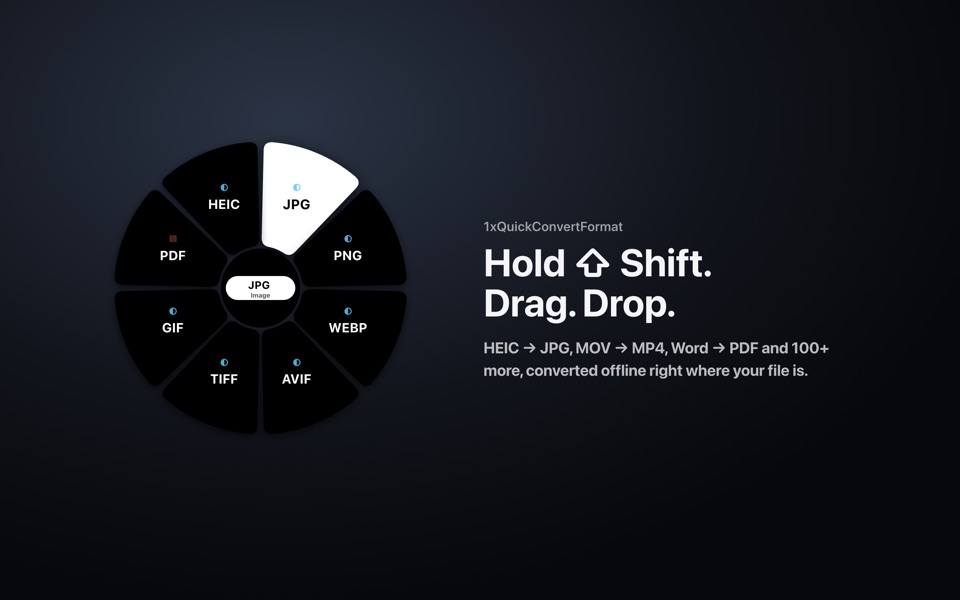
- Hold Shift while dragging one or more files in Finder.
- A format wheel appears under the pointer, listing only the formats those files can become.
- Drop the files on a format. The new files appear next to the originals, numbered if the name is taken.
No window to open, no menu to learn.
What it converts
| Group | Conversions |
|---|---|
| Images | HEIC (iPhone photos) to JPG, PNG, WebP, AVIF, GIF, TIFF, BMP, ICO. SVG to PNG or PDF |
| Video and audio | MOV to MP4, MKV, WebM, GIF. Extract MP3 or M4A from video. Convert between MP3, WAV, FLAC, AAC, OGG |
| Office documents | Word, Excel, PowerPoint, Pages, Numbers, Keynote to PDF, and between Office formats |
| PDF to PNG or JPG images, or TXT | |
| Data and code | CSV, JSON, YAML, TOML, XML to each other. Source code to syntax-highlighted HTML or PDF |
Built for Vietnamese text
Many Vietnamese documents were typed when computers still used fonts like .VnTime: lesson plans, official letters, the notes of someone now retired. On a modern machine the letters break apart. 1xQuickConvertFormat converts TCVN3 and VNI text to Unicode, detects encodings (UTF-8, Windows-1258, VISCII) and exports CSV files that open in Excel with correct diacritics.
It is the part of the app I like most, because it rescues things people thought were lost.
Privacy
- Every conversion runs on your Mac. Files are never uploaded.
- No ads, no trackers.
- The app only goes online to activate and check its licence, about once a week, and keeps working offline for up to 30 days between checks.
Details are in the privacy policy.
Pricing
Each plan covers one Mac.
| Plan | Price | Includes |
|---|---|---|
| Free | 0 | Images, text, data, source code |
| Personal, 1 year | US$8.99/year (199,000 VND) | Adds video, audio, Office, PDF, batch conversion, quality, size and output-folder options |
| Personal, lifetime | US$19.99 once (479,000 VND) | Same as Personal, 1 year |
- A Free code comes from a friend who uses the app, or from joining the Telegram channel.
- A new install gets a 7-day trial of the Free features.
- Each activated Mac has 3 invite codes. When 3 invited friends use the app for more than a week, the inviter gets 50% off Personal.
- Moving to a new Mac is allowed up to 3 times in 12 months. No refunds unless required by law; overpayments and double charges are returned.
Prices copied from the product page on 20 October 2026. The official pricing and checkout are at 1x.xuanhieu.org/qcf.
Install
- Download the
.dmgfrom GitHub Releases. - Open it and drag 1xQuickConvertFormat into Applications.
- Open the app, choose a language, then start the trial or enter a code under Settings › Licence.
Requires macOS 12.3 or later.
Payments and licensing are live. The public installer is waiting for an Apple Developer ID signature so macOS opens it without a warning; this page will be updated when it is on GitHub Releases. Until then, write to mail@xuanhieu.org for early access.
Limits
- macOS only. The first public build is not yet signed with an Apple Developer ID.
- Video and audio need FFmpeg. Office conversions that keep the layout need LibreOffice. Both are free, and the app detects them when installed.
- One licence key per Mac.